

We know pictures contain memories, which you never want to lose, and that is why you came here to know how to get pictures from a broken iPhone. You are not alone. Many people face this challenge when devices stop responding. Fortunately, there are several methods to retrieve your memories safely without compromising data.
Follow this guide as we will break down practical steps, explaining how you can regain access to your precious photos. So, let’s get started.
How to Get Pictures From a Broken iPhone? 3 Methods
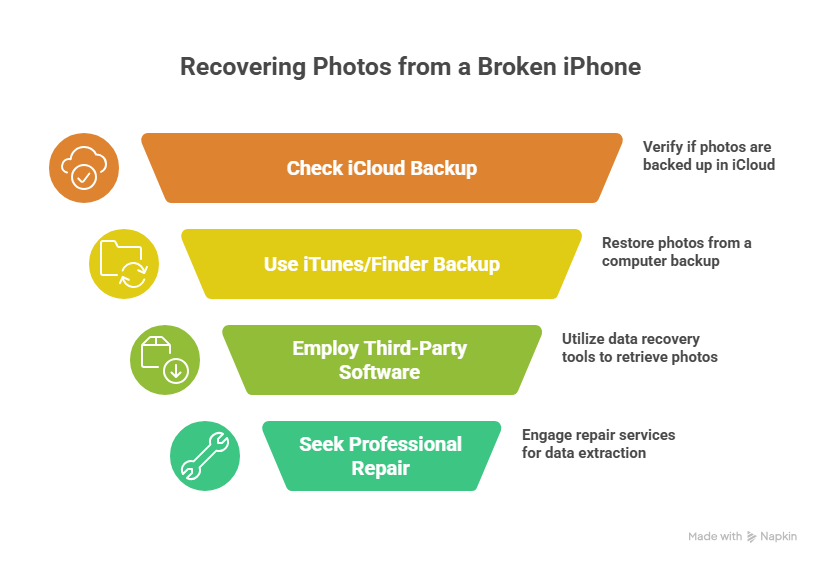
Method 1 – Using Existing Backups
If your iPhone was syncing with iCloud or backed up on a computer, then recovery of the photos is simple.
iCloud Backup
- Open a browser on your working device.
- Visit iCloud.com and log in using the same Apple ID as your broken iPhone.
- Navigate to the Photos.
- Download the images you need.
Note: This works only if iCloud Photos was enabled before your iPhone broke.
iTunes/Finder Backup
- Connect your broken iPhone to a computer you have synced with previously.
- Open iTunes (or Finder in newer macOS).
- Check if your iPhone appears.
- If it does, restore a backup to a new device.
This method preserves your images without the need for any third-party tool.
Method 2 – Using a Third-Party Software
If the above methods do not work, then it is time to figure out how to get pictures from a broken iPhone with third-party software.
- Get a reliable data recovery tool on your computer.
- Connect the broken iPhone.
- Scan for recoverable photos and export them to your computer.
These tools allow you to retrieve files selectively, without the need to do a full restore.
Method 3 – Professional Repair Services
If your iPhone is not turning on or the touchscreen is not working. You need to get a professional iPhone repair Orlando . It is the best route because such services can either repair the phone enough to retrieve data or perform a complete extraction. With them, you get:
- Replace broken screens or internal components.
- Access memory chips for data extraction.
- Ensure your photos are safely transferred to another device.
Note that data retrieving costs are usually high but worth it when you want to preserve priceless memories, especially when you have no clue how to get pictures from a broken iPhone.
Transferring Photos to a New iPhone
Once you successfully recover the pictures, the next step is to move them to another device. If you have a backup, then do the following three simple steps:
- Set up the new iPhone.
- Restore from the iCloud backup or iTunes/Finder backup from your computer.
- If no backup exists, you can manually transfer photos.
Given that 71% of users face data loss, and that emotional stress and repair costs are very real, knowing how to get images from a broken iPhone is not a convenience but a dire need.
Accessing iCloud From a Non-Apple Device
It is not necessary that you need a Mac or an iPhone to log in to iCloud and retrieve photos. A Windows PC or any device with a browser can be used. Here are simple steps to do it:
- Go to iCloud.com and sign in.
- Open the Photos section.
- Select and download your pictures.
This flexibility makes it easy to recover images even if you only have access to a non-Apple device at the moment.
Using Other Devices for Recovery
Sometimes you are not fully into the Apple ecosystem. You might have a Samsung or other Android device you rely on for photos. In such cases, going to a reliable Samsung phone repair service or other cross-device support can help you manage data transfers, ensuring nothing is lost in the transition.
Preventing Future Data Loss
Once you get your photos, take the necessary steps to prevent future issues.
- Enable iCloud Photos for automatic cloud backups.
- Regularly sync with your computer using iTunes.
- Keep multiple backup solutions.
These steps minimize panic when accidents happen, and you don’t rush to know how to get pictures from a broken iPhone.
When to Seek Full-Service Cellphone Recovery?
When all methods fail, you need to go to a professional smartphone repair Orlando that can extract photos even from severely damaged devices. Such services often include full diagnostics, memory recovery, and secure transfer to a new device.
Having a professional in such cases improves your data recovery chances because losing sensitive data is something no one even wants to dream about.
FAQs
1. How do you get pictures off a broken iPhone that won’t turn on?
You can log in to your iCLoud account from a Windows PC or any other device. If you don’t find a backup there, then you can go to a professional recovery service to access internal memory safely.
2. What are four ways to recover lost photos from a broken iPhone?
- Restore from iCloud backup.
- Restore from iTunes/Finder backup.
- Use third-party recovery tools.
- Get professional data recovery services.
3. How to transfer data from an old, broken iPhone to a new iPhone?
Restore from iCloud during the new iPhone setup or use an iTunes/Finder backup. If the old phone cannot back up, retrieve data via recovery software.
4. Can I access iCloud from a non-Apple device?
Yes, you can sign in to iCloud.com via a web browser to view and download your photos.
The Bottom Line
With the right guidance and a little patience, recovering images from a broken iPhone is not a challenging task. Knowing how to get pictures from a broken iPhone safely ensures that your memories remain there. Whether you rely on iCloud, computer backups, or professional assistance, getting your data in such cases is important.
For those who want a reliable, secure solution, we at iGadget Repair offer professional services to retrieve photos and reliable phone repair Orlando. Our goal is simple: keep your memories intact and your devices functional. So, don’t wait until a crack or unresponsive screen turns into permanent data loss and take action today.

