
If you have ever dropped your phone in water, your heart drops faster than it sinks into water. The reaction is the same whether it’s a toilet, swimming pool, kitchen sink, or that unexpected rainstorm that caught you off guard. In that split second of panic, your first instinct might be to grab a bag of rice.
However, that’s the worst thing you can do. Rice can actually make water damage worse by pushing moisture deeper into your device’s delicate components.
When water infiltrates your phone’s internal circuitry, you’re racing against time. Every second counts, and the wrong move could turn an easy repair into a costly replacement, or worse, permanent data loss.
If such is the case, how to repair a water-damaged phone the right way?
Step-by-Step Procedure for Water-Damaged Phone Repair
In water damage, the repair does not start once you get your liquid damage phone to a repair shop. It happens the moment you take your phone out of water.
While it is the professional who starts fixing or replacing the damaged parts, the precautionary measures are also a part of how to repair a water-damaged phone. If you dropped your phone in water, below is a step-by-step guide on how to fix it.
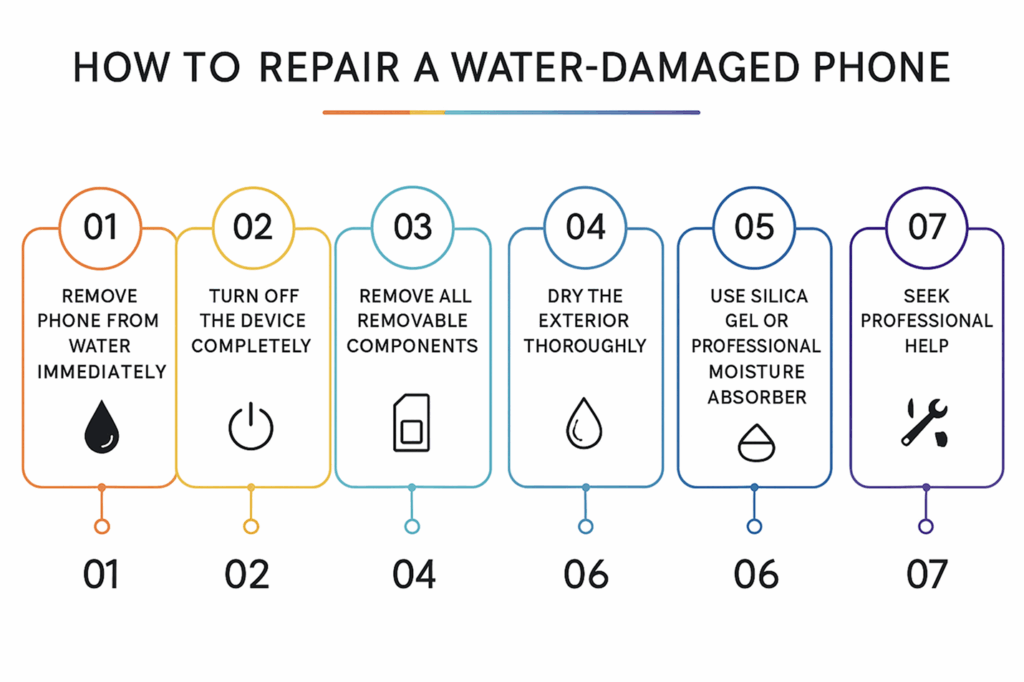
1. Remove the Phone from Water Immediately
This is one of the most important steps in how to repair a water-damaged phone, which you might have already performed. Every second of submersion increases the damage to internal components. Don’t hesitate or worry about getting wet or dirty. Grab your phone right away, as speed is critical in minimizing liquid damage.
Your phone is more important at the moment, and getting wet should not be your concern.
2. Turn Off the Device Completely
The worst thing you can do to your phone after taking it out of water is checking if it’s working fine or not. If the phone works fine, people get at ease, thinking the internals aren’t damaged.
Therefore, power down your phone immediately, even if it appears to be working normally. If the screen is unresponsive, hold the power button until it shuts down completely. This prevents electrical short circuits that can cause permanent damage.
3. Remove All Removable Components
Take out the SIM card tray, phone case, and any other accessory. This allows better airflow around your device and prevents these components from getting damaged by trapped moisture. Store these parts separately in a dry location.
However, you’ve to be careful when removing the SIM card tray. Hold your phone in a position where the water seeps out when you insert the pin.
4. Dry the Exterior Thoroughly
Use a clean and dry cloth, towel, paper tissue, or microfiber cloth to gently pat dry all exterior surfaces. Pay special attention to charging ports, speakers, headphone jacks, and any openings where water might be pooled. Avoid using heat sources like hair dryers, as excessive heat can damage internal components.
Note: Do not rub dry. Only pat dry.
5. Shake Out Excess Water
Gently shake your phone with ports facing downward to help gravity remove water from charging ports, headphone jacks, and speaker grilles. Don’t shake too vigorously to avoid causing additional internal damage or an impact fall. This step helps remove as much standing water as possible before the drying process.
6. Use Silica Gel or Professional Moisture Absorber
The rice bag technique is one of the most dangerous ways to absorb water in your phone. But did you know that a similar technique is actually effective and does not further damage your phone? The silica gel you find in shoe boxes and handbags is not only effective but also safe. It does not push the water inside your phone, like rice does.
Therefore, once you shake out the excess water, put your phone inside multiple silica gel pouches. Don’t throw them away when you buy new shoes or handbags. Instead, keep them and store them somewhere safe, where you can remember putting them.
7. Seek Professional Help
While most of us know that water damage doesn’t start right away, many people don’t take it into consideration. Many people, after they perform all six steps, sit relaxed, thinking their phone is fine now. But the motherboard can start corroding later, and as a result, you might lose your entire data permanently.
Therefore, always take your phone to a reputable phone water damage repair shop after following all the precautionary measures. Even if there is no issue, you will have the surety that your phone is safe to use.
🔧 Water damaged your phone?
At iGadget Repair, we specialize in fast, affordable water damage repairs to bring your device back to life.
Get a free quote today!
Choose a Professional Phone Water Damage Repair & Stay Away From Trouble
Your phone is your valuable personal asset, and valuable things need proper repair. But do not make the mistake of putting your phone in a rice bag if you dropped it in water. Not only is it ineffective, but it also pushes the water in ports inside your phone.
The proper way for how to repair a water-damaged phone is by using the right method. It includes steps like shaking the excess water, placing it in silica gel bags, and seeking professional repair.
Even more important is choosing the right third-party phone repair service. Opting for the wrong service without proper research on phone liquid damage can result in more problems, like voiding your warranty or causing additional damage. Always choose the right phone repair service, like the one we offer at iGadget Repair, and have peace of mind.
How to fix a wet phone properly if I dropped it in water?
To fix a wet phone properly, perform the following actions:
- Turn off the device
- Remove all removable components
- Dry the exterior and shake off excess water
- Use silica gel
- Seek professional help
Is putting your phone in a rice bag to absorb water safe?
No, it isn’t. While rice does absorb some water, it is more harmful than you think. It clogs ports, limits airflow for quick drying, and, worse, pushes some water inside the phone. A much safer and effective method is putting your phone in silica gel pouches you find in shoeboxes and handbags, which absorb the water better without harming it.
How much does water damage phone repair cost?
The cost depends on the damage’s intensity. Instantly taking the phone out of the water hardly costs $50-75 for basic cleaning and inspection. However, longer stays can cost $150-400 or even more, if major components like the motherboard need replacement.
How long does it take to repair a water-damaged phone?
It depends on the severity of the damage. If you instantly take the phone out of the water, it will hardly take 10-15 minutes to repair. But if it has stayed in the water for long, it can take 2-5 days or even longer if parts need to be ordered.

